
Author

Every VAT cycle starts the same way in many finance teams. Sales data sits in one system, purchase records live in spreadsheets, and branch figures arrive late by email. Someone then has to match everything by hand before a return can be prepared. One wrong rate or one missing invoice, and the numbers stop agreeing with each other.
This is the daily reality of manual VAT management, and it is why more businesses now want to buy automated VAT management software. The right system calculates VAT on each transaction, keeps documents organised, reconciles input and output tax, and prepares reports from the same data.
This guide explains what VAT automation does, which features matter, what to check before you buy, and how SmartVAT automated VAT management software fits into the picture for businesses in Bangladesh.
What Is Automated VAT Management Software?
Automated VAT management software is a system that calculates VAT on every transaction, stores VAT records and documents in a structured way, reconciles input and output tax, and generates VAT reports and returns from the same data. Finance teams stop rebuilding the same figures by hand every period.
In practical terms, a VAT management system sits between your daily transactions and your VAT obligations. It applies the correct VAT treatment when a sale or purchase is recorded, then uses that data to produce the registers, invoices and returns that tax authorities expect.
A simple business example
Imagine a retailer with five branches. Each branch sells hundreds of items a day and buys stock from several suppliers. Without automation, each branch sends its own spreadsheet at month end, and the head office spends days combining them and checking for errors.
With a VAT automation software setup, transactions from every branch flow into one platform. The head office sees consolidated VAT liability at any time, and the return is prepared from verified records instead of a last-minute spreadsheet merge.
Why Businesses Are Moving from Manual VAT Management to Automation
Manual processes work when volumes are low. As a business grows, the weaknesses become expensive. These are the most common problems:
- Calculation errors. Formulas get copied wrongly, rates are applied inconsistently and rounding differences pile up. Errors found later mean corrections, rework and uncomfortable questions.
- Disorganised documentation. Invoices, credit notes and purchase records spread across folders and inboxes are hard to find when an officer or auditor asks for them.
- Slow return preparation. Collecting, cleaning and matching data takes days. Finance staff spend their time on data handling instead of analysis.
- Branch complexity. Each location may record transactions differently. Consolidating them by hand multiplies the risk of omissions and duplicates.
- Inconsistent financial records. When sales, purchase and accounting data disagree, nobody trusts the VAT figures.
- Limited visibility. If you only learn your VAT liability when the return is prepared, you cannot plan cash flow properly.
- Repetitive reporting and reconciliation. The same reports are rebuilt every period, which wastes skilled time.
- Compliance risk. Inaccurate or incomplete records can lead to penalties, disputes and difficult audits.
The real consequence is not only extra work. It is lost management time, weaker financial control and a higher chance of mistakes reaching an official filing.
Essential Features to Look for When Buying VAT Management Software
Not every product offers every capability, so use the list below as a checklist for demos and vendor questions. Ask the vendor to show each feature working, not just listed on a brochure.
Automated VAT calculation
The software should apply the right VAT treatment automatically, including different rates and supplementary duty where relevant. This matters most for manufacturers, FMCG companies and any business that sells items under mixed VAT treatments.
VAT return preparation and Mushak documentation
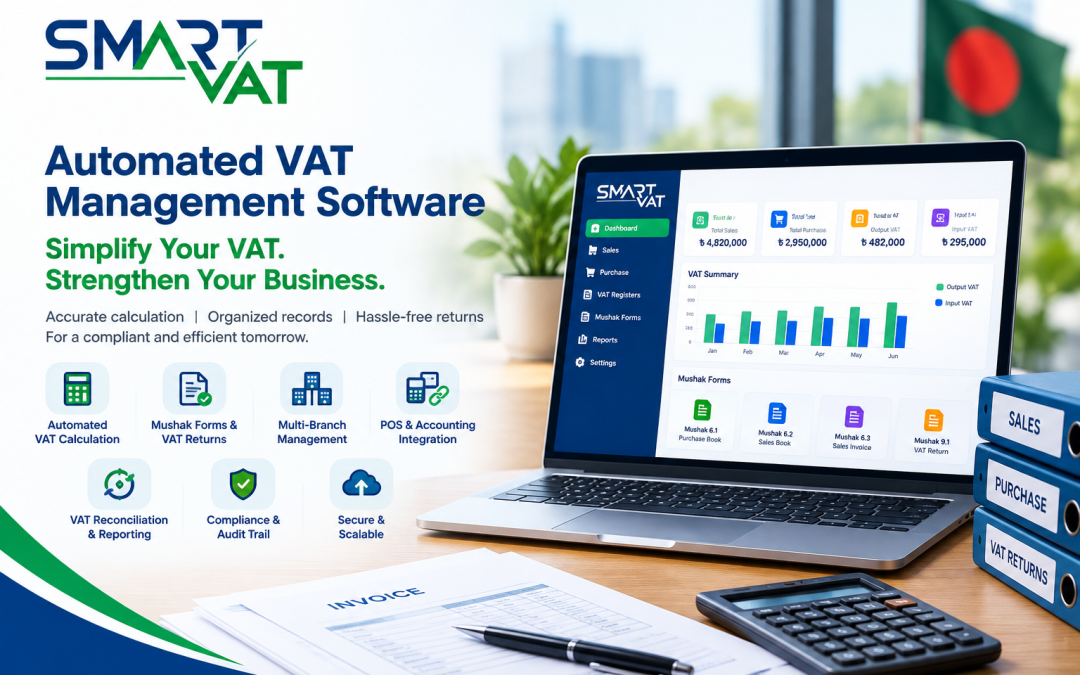
In Bangladesh, VAT documentation is organised through Mushak forms. Examples include the Mushak 6.1 purchase book, the Mushak 6.2 sales book, the Mushak 6.3 sales invoice and the Mushak 9.1 VAT return. A useful VAT invoice management software tool generates these forms from your data and keeps a record of each one. Every VAT-registered business benefits, but the gain is largest for companies issuing many invoices.
Multi-branch VAT management and a centralised dashboard
If you operate from several locations, look for multi-branch VAT management with consolidated and branch-level views. Head offices of retail chains, supermarkets and distributors gain the most because they need both the full picture and the detail behind it.
POS and accounting integration
Integration removes double entry. When your point of sale, ERP or accounting system feeds the VAT platform, the VAT data stays aligned with the rest of your records. Ask exactly which systems the vendor can connect to and how the connection works.
VAT reconciliation and historical reporting
VAT reconciliation software should match input tax against output tax and let you review past periods without digging through old files. This helps finance managers answer questions quickly and supports period-to-period comparisons.
Compliance monitoring and audit trail
Look for a clear record of who entered, changed or submitted what, along with reminders for filing dates. These controls matter most for larger teams and for businesses that expect regular scrutiny.
Want to see these capabilities in action? Request a SmartVAT Demo
How Automated VAT Management Software Improves Business Operations
The benefits show up across the finance function, even without precise numbers. Results vary by business size, data quality and how well the system is set up.
- Less repetitive manual work. Data entered once is reused for invoices, registers and returns.
- Better data accuracy. Automatic calculation and validation reduce typing and formula mistakes.
- Faster VAT reporting. Reports are generated from live records instead of being assembled at the deadline.
- Visibility across branches. Management can review VAT positions for each location and for the whole company.
- Organised documentation. Invoices and returns are stored in one place and easier to retrieve.
- Efficient finance teams. Staff move from data wrangling to review, planning and analysis.
- Better audit readiness. Complete records and an audit trail make it easier to respond to queries.
- Consistent compliance workflows. The same process runs every period, whoever is on leave that week.
What Should You Consider Before Buying Automated VAT Management Software?
Use this ten-point checklist to compare options and prepare questions for vendors.
- Compliance with Bangladesh VAT requirements. Confirm the software follows the VAT and Supplementary Duty Act 2012 and current NBR forms. Check whether the vendor appears on the NBR list of enlisted software, and ask how quickly the product is updated when return forms or rules change.
- Functionality and usability. A tool nobody wants to use will not be used. Test the interface with your own accounts staff during the demo.
- Multi-branch capability. Ask how branches are set up, how data is consolidated and whether you can produce both combined and location-level reports.
- POS and accounting integration. Ask for the exact list of supported systems and the integration method. Do not assume it works with your current software.
- Reporting and reconciliation. Check that the reports you need today exist, and that input and output tax can be reviewed and matched easily.
- Data security and access control. Ask about user roles, permissions, backups and where data is hosted.
- Implementation and onboarding. Find out how setup, configuration, testing, staff training and migration of existing records are handled.
- Scalability. Your transaction volume and branch count may grow. The system should handle that without a replacement project.
- Vendor credibility and support. Ask for references in your industry, support hours and how issues are escalated.
- Pricing and overall value. Compare total cost, including setup, support, integration and future changes, against the time and risk you remove.
Why Bangladesh Businesses Need VAT Automation
VAT in Bangladesh is governed by the Value Added Tax and Supplementary Duty Act, 2012 and the rules made under it, which you can find through Bangladesh Laws. The National Board of Revenue (NBR) administers the system and publishes forms, notices and guidance.
Businesses must keep accurate records, issue the correct documents and submit returns in the prescribed form. Rates, forms and procedures can change through annual Finance Acts, so staying current is a continuing task, not a one-time setup.
A recent example is the return cycle. According to The Daily Star, the Finance Act 2026 allows VAT returns to be filed every three tax periods, within 15 days after the third period ends, while monthly filing remains available by choice. A longer cycle does not reduce the need for clean records. It places more transactions into a single return, so any gap in the data is harder to find and fix.
Branch-level transactions add another layer. Every location creates invoices, purchases and adjustments that must roll up correctly. Automation helps keep that flow consistent. Always confirm current obligations on the NBR website before relying on any summary, including this one.
Why Consider SmartVAT for Automated VAT Management?
SmartVAT is a VAT management system built for Bangladesh. According to the SmartVAT website, it is enlisted by the National Board of Revenue and designed around the VAT and Supplementary Duty Act, 2012. The Bravosoft page for SmartVAT, a VAT compliance solution describes the product in more detail.
Here is how its published capabilities connect to the problems described earlier:
- Calculation errors: SmartVAT calculates VAT on sales and purchase transactions automatically and supports multiple VAT rates and supplementary duties.
- Disorganised documentation: it generates Mushak forms, and the SmartVAT product overview lists forms including 6.1, 6.2, 6.3, 6.7, 6.8, 9.1 and 9.2, with digital record keeping for returns.
- Slow return preparation: it supports paperless return preparation, deadline tracking and filing reminders.
- Branch complexity: it manages VAT across multiple branches from one platform, with combined or location-specific reports.
- Limited visibility: it offers real-time VAT liability tracking and reporting from a dashboard.
- Reconciliation effort: it matches input and output tax automatically.
- Audit pressure: it keeps an audit trail of transactions, calculations and filings.
- Disconnected systems: it connects with ERP, accounting and POS systems through API, and the vendor states that existing records can be migrated during onboarding.
The SmartVAT site also describes cloud, on-premises and hybrid deployment models, along with a structured implementation approach covering assessment, configuration, testing and integration. As with any purchase, ask for a live demonstration using your own scenarios so you can confirm that the features match your processes.
Ready to see how it fits your business? Request a SmartVAT Demo or Explore SmartVAT.
Who Can Benefit from Automated VAT Management Software?
Any VAT-registered business can benefit, but some profiles feel the pain more sharply.
- Retail chains: many small transactions across locations make manual consolidation slow and error-prone.
- Supermarkets: wide product ranges and high daily volumes need accurate item-level VAT treatment and fast reporting.
- Multi-branch businesses: head offices need one view of VAT without waiting for each branch to send files.
- Manufacturing companies: raw material purchases, production records and sales all affect VAT, so clean links between them matter.
- Distribution businesses: frequent stock movements and many invoices increase documentation workload.
- Growing SMEs: spreadsheets that worked last year start to break as volumes rise, and a small finance team cannot absorb the extra effort.
- High-transaction businesses: any company issuing large numbers of invoices benefits from automatic calculation and storage.
SmartVAT lists FMCG, furniture, chemical, pharmaceutical, oil and gas, and hotel and restaurant businesses among the industries it serves.
Conclusion: Make VAT Management More Efficient with the Right Software
Choosing to buy automated VAT management software is a decision about accuracy, control and time. Manual methods strain under higher volumes, multiple branches and changing rules. A well-chosen VAT automation platform brings calculation, documentation, reconciliation and reporting into one consistent process.
Start with a clear list of your requirements, use the checklist in this guide, and test each shortlisted product with real scenarios. SmartVAT, an NBR-enlisted VAT management solution with multi-branch support, Mushak form generation and system integration, is worth exploring as you compare options.
See SmartVAT with your own business scenarios. Request a SmartVAT Demo or Explore SmartVAT.
Frequently Asked Questions
What is the best automated VAT management software for businesses in Bangladesh?
There is no single best option for every company. The right choice depends on your industry, branch count, existing systems and compliance needs. Look for NBR enlistment, current Mushak form support, integration options and reliable local support. SmartVAT is one NBR-enlisted option worth evaluating through a demo.
How much does automated VAT management software cost?
Cost depends on factors such as users, branches, integrations, deployment model and support. SmartVAT does not publish pricing on its official pages, so the most reliable way to get a figure is to request a demo and ask for a quotation based on your requirements.
Can VAT software automate VAT return preparation?
Yes, many products can prepare return data from recorded transactions, though capabilities differ. SmartVAT states that it generates Mushak forms such as 9.1 and 9.2 from transaction data. Ask any vendor to confirm support for the latest return forms required by NBR.
How do you calculate VAT using the tax fraction?
The tax fraction converts a VAT-inclusive amount into its VAT portion. It equals Rate / (100 + Rate), which is 15/115 at an illustrative 15% rate. Multiply the gross price by this fraction. For BDT 1,150, the VAT is BDT 150. NBR’s VAT FAQ uses the same 15/115 approach in its examples.
Is VAT management software suitable for small businesses?
It can be, especially once transaction volume or record-keeping becomes hard to manage in spreadsheets. Smaller businesses should weigh cost against the time saved. The Bravosoft page describes SmartVAT as suitable for businesses of all sizes.
Can one VAT software manage multiple business branches?
Some can. Multi-branch VAT management lets you consolidate data from several locations and view it centrally. SmartVAT supports this, with combined or location-specific reporting.
Does VAT automation software integrate with POS systems?
It depends on the product. SmartVAT states that it integrates with ERP, accounting and POS systems through open API. The exact integration for your POS should be confirmed with the SmartVAT team during the demo, since each setup is different.
How does automated VAT software reduce VAT calculation errors?
It applies calculation rules automatically at the time of each transaction, so staff no longer type formulas or copy figures between files. It also reduces mismatches by using one data source for invoices, registers and reports.